- Turn off the unit, disconnect any Ethernet cables attached to the module.
- Open the unit and locate the reset button. This can be found one of two different spots:
Spot 1: Located on the lower left of the module in the corner
Spot 2: Located on right side of the module above the PoE ports
3.Press and hold the reset button and turn on the unit.
4. After 6 seconds, release the button and then the unit should revert back to default settings.
5. Default IP After Reset is: 192.168.2.1 Gateway: 192.168.2.1
Note: The devices come shipped configured to 192.168.1.10 and the reset changes the IP back to 192.168.2.1.
7. Follow the manual’s RJ45 remote control port section settings, they are listed below:
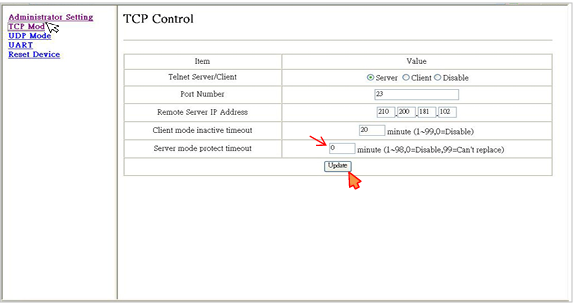
TCP control: server mode protect timeout set to 0
UART control: Baud rate set to 9600
8. Device is ready to be used. It is important to do a power reset on the device for the settings to take effect. This is done by disconnecting and reconnection the input power.